


Showing posts with label Media and Audio. Show all posts

Saturday, April 28, 2012

Equalizer v3.1.1 unlocked Apk

Best Blog Tips
| |
0 comments
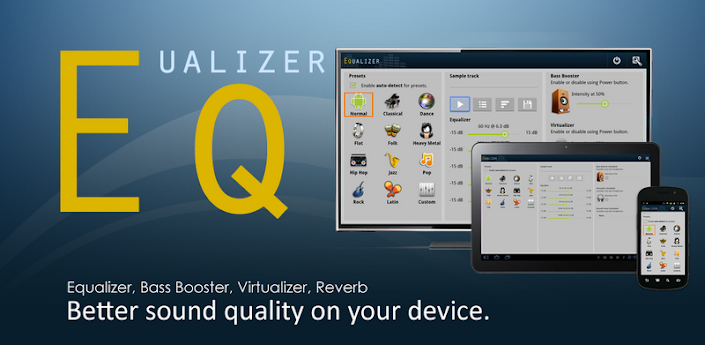
Equalizer app and widget to control sound effects on your Android device.
Improve your phone or tablet’s sound quality with the first true global Equalizer app and home-screen widget!

Equalizer lets you adjust sound effect levels so that you get the best out of your Music or Audio coming out of your phone. Apply Equalizer Presets based on Music Genre, or quickly create your own custom preset with the 5 band Equalizer controller. Additional Audio Effects supported include: Bass Booster, Virtualizer and Reverb Presets.
★ Permissions: Requires INTERNET_PERMISSION for downloading additional widget skins.
★ Requires Android 2.3 Gingerbread or up. Custom ROMs may not work due to issues with the ROM. If your ROM works please post so that others know. If you have issues, please contact us and let us know what ROM you are using.
Features:
★ 11 Stock Presets
★ Preset auto-detection (See list of supported players below)
★ 5 Band-level Equalizer Controller
★ Audio sampler to test your Equalizer settings
★ Bass Booster
★ Virtualizer
★ Reverb Presets
★ Integrates with stock Android Music player
★ Works on both wired and Bluetooth A2DP headsets
★ Works with streaming music like Pandora, Spotify, etc.
★ Power Mode options to enable/disable effects
★ Beautiful 4×1 and 2×1 Equalizer widgets for your home-screen
★ Additional widget skins available for download
★ Transparent background mode available for widgets
★ Notification shortcut available for quick access
★ Fully optimized for phones and tablets
★ No root required
Full features include: (Requires purchasing Unlock key)
★ Save Custom Presets
★ Delete, Edit, Rename Presets
★ Create Home-screen shortcut for Presets
★ Backup and Restore Presets from SD card
Stock presets include:
★ Normal
★ Classical
★ Dance
★ Flat
★ Folk
★ Heavy Metal
★ Hip Hop
★ Jazz
★ Pop
★ Rock
★ Latin (New)
The preset auto-detection feature does not work with all third-party music players; however, we will keep adding support to new players based on popular demand. The list of known supported Music players includes:
* Android Music Player
* Winamp
* UberMusic
* PlayerPro
* RealPlayer
* myTouch 4G Music Player
* Meridian Player
* RockOn
* doubleTwist Player
* WIMP
* MIUI Music Player
* ³ (cubed)
* PowerAMP
* Zimly
* bTunes
* Vanilla Music Player
Rhapsody Player
* MixZing
* Just Playlists
* Archos Music Player
* More to come…
Note: Please make sure to read the “Helpful tips” when you first install the application.
Known Issues:
* CM7 – All CM7 issues have been resolved, make sure you are running CM 7.0.2 or later. Early versions may still give you issues.
* Buglessbeast – This firmware mod does not seem to have proper support for the new Equalizer APIs at this time
* Sony Xperia Arc Media Player – Sony’s Media Player force closes. This is a bug in Sony’s app, we tried to workaround it but cannot. We contacted the developers about the issue. Until it is resolved we recommend you use a different media player.
* Amazon MP3 – Amazon’s MP3 player force closes when you play a song. Amazon has updated their cloud player in order to fix this issue, please update to latest version in the Market.
* HTC Desire HD / HTC EVO – People have reported intermittent issues with the stock gingerbread firmware on this device. Users who have replaced their firmware with the CyanogenMod ROM no longer have issues. We have worked around the issues to make it more robust. Force closes should be gone, background service still gets killed every now and then though, but it should start back up cleanly now.

Download

Thursday, April 26, 2012

Music DropNPlay Player v1.0.09 full Apk

Best Blog Tips
| |
0 comments
Dropbox Music, Dropbox player, Music Dropbox, Drop and Play
Do you have an android phone? And do you listen to the Music on your phone? And are you tired of copying songs from your computer to your phone via USB cable? If the answer is yes, then MusicDropNPlay can simplify your life.

If you have not used Dropbox, Dropbox is a free cloud service which allows you to bring all your photos, docs and music anywhere. You can upload your music to your Dropbox account from your computer and MusicDropNPlay can stream and playback it on your android device. No need to copy songs via the cable anymore. To learn more about Dropbox, please check www.dropbox.com.
MusicDropNPlay allows you to stream mp3 songs directly from your Dropbox account in real-time. It has extra features normal players don’t have:
• Real time streaming – no need to download the song completely before playing it.
• Ability to seek to any position, which may not be even buffered.
• A user-friendly Dropbox file explorer letting you select the songs you want to listen.
• One button press to add all the songs from a folder you select.
• A sleek playlist widget making sorting and reordering so easy.
• Online and offline modes making sure you have music to listen wherever you go aeven there is no network coverage.
• Headset in-line remote control support keeping your phone in the pocket all the time.
MusicDropNPlay: drop music anywhere and play music anytime! Your ultimate Dropbox music player on your Android phone!

Download

ZPlayer v3.1.3 full Apk

Best Blog Tips
| |
0 comments
Windows Phone 7 / Zune themed media player for Android OS.
Welcome to ZPlayer a Windows Phone 7 / Zune themed player.
This application is part of the wp7android project.
Check out the official site: http://wp7android.com/ for other great applications.

*note ZPlayer has graduated to its Beta stage of development.
*note The Application uses android framework Audio Effect API, this API was introduced since android 2.3. Therefore only devices that have at least Android version 2.3 will be able to take advantage of this feature.
++ if you use a third party equalizer that controls the output mix for all media playing on the device, disable it before using this application. This application needs to control its own audio effects.
-audio effects implemented include Equalizer, Bassboost and Virtualizer based on Android 2.3
* The Android Framework support shoutcast streams (external urls) from Android version 2.2 and later, so only devices that have Android 2.2 and later will be able to take advantage of the streaming radio.

Download

Wednesday, April 25, 2012

VidTrim Pro – Video Editor v2.0.1 Apk

Best Blog Tips
| |
0 comments
Trim videos, grab frames, compress your videos and share all on your phone.
VidTrim Pro is a video editor and organizer for Android. It includes multiple features like trimming, frame grabbing and transcoding. You can also share your videos with your friends directly through the app.

Please try the free ad supported version first. The following features are supported by both free and paid versions:
- Video trimmer. Trim video clips right on your device
- Trim original clip (overwrite)
- Save as a new clip
- Play video clips
- Share video clips. (Send e-mail, upload to YouTube etc.)
- Rename video clips
- Delete video clips
Features exclusive to VidTrim Pro:
- No ads
- Frame grabber. Extract/save frames from your video clips as images.
- Transcode (resize and compress) video clips to smaller sizes.
********
Some known problems on certain devices:
- HTC Incredible: Internal storage is buggy. Use SD Card to store your videos.
- DELL Streak: Official ROM is not supported. It has problems with loading native libraries.

Download

Sunday, April 22, 2012

TuneIn Radio Pro v6.0 APK

Best Blog Tips
| |
0 comments
Browse and listen to radio — live, local and global.
Listen to the world.
TuneIn is a new way to listen to the world through live local and global radio from wherever you are. Whether you want music, sports, news or current events, TuneIn offers over 50,000 stations and 1.2 million on-demand programs for you to choose from.
The TuneIn Radio Pro app for Android puts this entire experience in the palm of your hand with the added benefit of recording what you’re listening to (requires memory card).
Important Update: This new version of TuneIn (5.3) includes Car Mode, which lets you listen to your favorite music, sports and news simply by speaking a command into your Android phone or tablet. This update also includes extra large buttons for easy viewing and control.

What’s in this version:
  1. Easily collect your new favorite tunes with the new buy button
  2. Connect with the listening community and join the conversation about what’s playing via Twitter
  3. Improved listening and interface performance

Download

aDJ Pro v0.3.1 APK

Best Blog Tips
| |
0 comments
aDJ is the most advanced digital DJ solution for android. Transform your device into a complete and portable DJ system.Features:
- Very accurate waveform visualization with diferent zooms and frequency tones
- IN/OUT and beat loops

- Automix mode with bluetooth and headset control
- Async BPM detection.
- Split Left channel to Pre-Fader Listening(PFL) and Right to master output
- Multitouch in Android3.0 or above
- Automatic pitch & beat sync
- Touch & scratch
- Low-pass, hi-pass, reverb, echo and flange effects
- 3-Band Equalizer with kill button
- Pitch shift
- Support MP3, WAV and OGG
- Pitch adjust 5%-50%, fine pitch and bend
- Low latency response
NOTE: Only recomended for +1Ghz and +512MB RAM


Download

TuneWiki Pro – Lyrics with Music v3.3.9 APK

Best Blog Tips
| |
0 comments
The Music Player with Synced Lyrics in any language
The only music player where you can get, share and talk about lyrics and music.
TuneWiki Pro is the Ad-Free version of TuneWiki’s award winning music player!

* Listen to any music with synced lyrics
* Dedicate songs to people
* Share lyrics from your favorite songs with your network of friends
* Get lyrics instantly translated into 40+ languages
* What does that song mean? Comment on and discuss the meaning of lyrics and songs
* Free, unlimited SongID with synced lyrics
* Discover new music in your SongBox – songs that are being played and recommended by your friends
* Explore Song Maps and real-time Top Charts to discover popular songs nearby and around the world
* Create, manage, and edit playlists
* View and edit detailed tag info for artists, albums and songs
* Supports installation to SD card. Please note that due to restrictions within the Android OS, the widget will be disabled when the app is on the SD card.

Download

Friday, April 20, 2012

SomaFM Radio Player v1.2.5RC1 APK

Best Blog Tips
| |
0 comments

Mirror
SomaFM: Over 20 channels of commercial-free, underground/alternative radio.
SomaFM’s official player for Android, giving you direct access to 20 year-round (plus seasonal holiday) channels of listener-supported, commercial-free, underground/alternative radio.

You can view and pick stations by Popularity, Genre or just see your favorites; See the title and artist of the currently playing and last 10 songs played. You can also bookmark favorite songs for purchase on Amazon or emailing to your friends. You can share what you’re listening to on Twitter, via email or text message. There’s also a section for SomaFM news and happenings.
If you’re on 3G or WiFi, you have access to our high quality 128k MP3 streams or 64k AAC-HE streams which sound amazing. And our low bandwidth 32k aacPlus streams work on slower cell networks, and still sound as good as 128k MP3 streams in most cases.
IMPORTANT NOTE:
We have reports of the current version not working reliably on several phone models, including Tmobile MyTouch, LG Nitro, HTC Desire w/Gingerbread (v2.3.7), LG Revolution 4G (Android 2.3.4). We are working on a fix for this.
What’s in this version : (Updated : Apr 3, 2012)
  • Fixed occasional crash on startup issue in most cases.
  • New HD Layout for 10″ Tablets
  • Speed improvements
  • Minor bugs fixed
Download

Wednesday, April 18, 2012

BestShot full v23 APK

Best Blog Tips
| |
0 comments

you can easily edit and play movies taken with your mobile phone or camera.
(WVGA or higher is recommended.)
BestShotR is a video editing application. It automatically edits and displays pictures or movies taken by a mobile phone or digital camera. You simply choose your preferred “Style” mode and your photo or movie will be transformed into an memorable video crafted by up-and-coming creators.

With BestShotR you can make your own “movie diary,” upload it to SNS and enjoy browsing through your “present” and “past” videos.
Each “Style” represents the video style perfect for your present mood. To make you
Download

Tuesday, April 17, 2012

VPlayer Pro v1.3.2 (Unlocked) APK

Best Blog Tips
| |
2 comments
The best video player for Android.
VPlayer 1.x is the next generation of VPlayer, which brings experimental HW accelerated decoding and rendering to HD MKV/AVI/MOV/FLV/TS/M4V/3GP for most Android devices.
Access your NAS/Wifi/UPnP/DLNA/DVR/Dropbox/Facebook/Gmail videos from VPlayer seamlessly!!!
This is a free trial for 7 days with full features. Please buy 'VPlayer Unlocker' to continue use VPlayer.
VPlayer is a HW accelerated Media player for android. It use HW video decoder at various containers and audio codecs combination.
Dual Core/High end devices ( Sensation , Galaxy S/S2 , Nexus-S ) can play 720p even 1080p MKV/AVI/MOV/FLV/TS/M4V/3GP.
VPlayer drains less bettery than SW based players such as MX Video Player, MoboPlayer.
ICS devices can play 1080p files with full HW accelerations, Honeycomb tablets can play 720p MKV with Full HW accelerations.
If you use MIUI, CM7 or unofficial ROMs that can not play MKV/FLV/MOV/AVI using default player, VPlayer is the best solution.
Features
Formats
- AVI,MOV,MKV,FLV,AVI,3GP,3G2,ASF,WMV,MP4,M4V,TP,TS,MTP,M2T
Video Codecs
- HW : MPEG-4,H.264,H.263
- SW : MPEG-4,H.264,RMVB,XVID,MS MPEG-4,VP6,H.263,MPEG-1,MPEG-2
Audio Codecs
- DTS,AC3,AAC,Vorbis,FLAC,MP3,MP2,WMA
- Mutitle audtio tracks support
Subtitle
- (Advanced) SubStation Alpha(.ssa/.ass), SAMI(.smi), SubViewer(.sub), Subrip(.srt), MicroDVD(.sub), MPL2(.txt)
- MKV subtitle extraction supported
- Unicode/Multibyte charset supported.
- Mutiple subtitle tracks support
- Increased subtitle readability with thicker border and shadow around text.
Transport
- HTTP
- RTP/RTSP/RTMP
- MMS
- HTTP Live Streaming with multiple bitrate
Supported devices
* ICS devices, Galaxy Nexus, Nexus S
* Honeycomb tables(TF101,GT10.1,Iconia500) : 720p High@4.1 ( no weighted prediction )
* Samsung Galaxy S2 : 1080p H.264 high@5.1/MPEG-4,1080i AVCHD MTS
* Samsung Nexus S, Galaxy S and variants : 720p H.264 High@5.1
* Samsung Galaxy Tab(7') : 1080p H.264 High@5.1. 1080i have interlace artifacts.
* Samsung Galaxy Note : 1080p H.264 High@5.1
* HTC Desire HD,ThunderBolt : 720p High@3.1/4.0(some Level 4.0 file have shutter problem)
* HTC Desire and QSD8250 baesd devices : 720p H.264 High@3.
* HTC Evo 3D : 720p High@5.1/1080p High@5.1(some 1080p files have shuttering)
* Dell Streak,Venue : 720p H.264 High@3.1
* HTC wildfire: video capability depends on your firmware.
* Moto Atrix: 720p High@5.1
* Xiao mi: 720p High@4.1
More devices are supporting...
Limitations
* Video capability depends on your devices HW video decodes' capability.
* Some devices(Moto Defy, Galaxy S/Tab) need gingerbread update.
* Tegra 2 based devices : H.264 High@4.1 ( no weighted prediction )
This software uses code of FFmpeg licensed under the LGPLv3 and its source can be downloaded from our site.
PERMISSIONS:
READ_LOGS: for feedback
INTERNET: streaming support
READ_PHONE_STATE: stop playback when calling
WAKE_LOCK: keep screen up
WRITE_EXTERNAL_STORAGE: rename or delete file
MODIFY_AUDIO_SETTINGS: change audio effects
VPlayer is the best video player for Android.
Download

Monday, April 16, 2012

Astro Player Nova v1.140 full APK

Best Blog Tips
| |
0 comments

Powerful music and video player with audiobooks and podcasts support. Advanced bookmarks, folder based auto-playlists, fast playback, equalizer, skins, scrobbling, fetching album art, auto-resume, lyrics, radio, podcasts and more.

IMPORTANT:
READ CONTACT DATA permission is used for assigning ring-tones to contacts.
GOOGLE ACCOUNT permission is used for for Google Reader integration (you’ll need to accept an additional android prompt in case you decide to sync with Google Reader)
Features
Supported formats
Audio: mp3, ogg, flac, m4b(partial support), mp4, 3gp, m4a, mid, wma(not on all devices), xmf, mxmf, rtttl, rtx, ota, wav, m4a, amr
Video: mp4, 3gp
Advanced bookmarks
Unlimited number of custom bookmarks
Folder auto-bookmarks
All tracks auto-bookmarks (restores position on per-file basis)
Bookmarking functionality is available also for video
Each bookmark restores not only playback position but the corresponding playlist as well
Unique features
Adjustable playback speed: fast/slow 2x – .05x and 2x speed with the same pitch
Non-Unicode encoding support (displays Artist, Album in your own language for Non-Unicode encodings)
Auto-resuming and undo/redo
Unlimited number of undo/redo playback positions
Auto-resume
Stores playback positions each ten seconds in order to recover properly after exceptional situations
Playlists
Convenient file browser with ability to play folders including any number of subfolders
Playlist auto generation based on a selected folder
Playlist library
Search in playlists and music browser
Sorting tracks by rating and play count
M3U playlists support
Android system playlists support
Misc
Equalizer
Equalizer presets
Internet radio
Custom skins
Multi-language
Lock screen with gestures and album art
Playlist shortcuts
Album/artist/genre browser
Scrobbling
Nice user interface with large buttons
Sleep timer
Delete file/folder option in the browser
Fetches missing album art from the net and SDCARD
Full screen album art
Full screen lyrics/auto lyrics
“Now playing” notification window
Resume/pause playback when the headset is plugged/unplugged
Bluetooth headset support
Quit application option (saves system resources)
Podcast subscriptions
Hotkeys, actions, menu, and buttons organizers
Release notes for latest stable version:
Video player improvements
Gapless playback
Bass boost
Playlist queue
Cover art fetching improvements
Cover art gallery
DAR.fm support with background downloading option
Backup improvements
Added French, Belorussian, Japanese localizations
Configurable playlist, playback speed context menus
Optional confirmations
Mono playback mode (advanced player only)
Search functionality in actions
Virtualizer effect for surround sound (Android >2.3 devices)
Skin specific assignment of buttons’ actions
Background podcast downloading with notifications
Exit functionality improvements
Customizable Home, Menu, Back, Search buttons
Number of visible auto bookmarks is limited by 500
Bookmark track duration was removed
Headset handling improvements
New skins
Scrobbling bug-fixes
Lock screen improvements
Full screen 4×4 widget
Download

Tuesday, March 27, 2012

iMediaShare 4.1 APK Mediafire

Best Blog Tips
| |
0 comments
Find and play personal and online video, music and photos
Enjoy watching phone videos and photos, and playing music on your large-screen TV!
iMediaShare transforms your Android device into a remote control seamlessly streaming personal and online media to your connected TV.
iMediaShare requires no additional hardware, no cables and no TV apps. All you need is an internet-enabled TV and a WiFi network.
iMediaShare lets you take your favorite content everywhere with you making it easy to share it with friends at any time on any connected screen.
Advantages over iMediaShare Lite:
- Ad-free experience
- Video playback from YouTube links
- Video playback of arbitrary mpeg files from the internet and other apps
- More online video channels in HD
Online channels in the full edition include: Animal Planet, Bild, Beet TV, Break.com, CBS News, CNBC, CNET (HD), CNN, COIN-OP TV, College Humor, Dailymotion, Deutsche Welle, Driving Sports, Earth Touch, Engadget, Euronews, Facebook, France 24, Funny or Die, G4, Harvard Business Review, HDNet, Les Debiles, MaYoMo, Motorz (HD), NASA TV, NY Times, Picasa, PortalZINE, PR Newswire, PSN, Revision3 (HD), Showtime, Spiegel Online, TED Talks (HD), The Onion, TWiT TV, VideoBASH, Vimeo, White House, YDN Design, YouTube (HD).
Supported players:
1) Televisions from Samsung (w/ AllShare), LG, Sony BRAVIA, Philips, Panasonic Viera, Toshiba
2) Game consoles: Sony PlayStation 3, Microsoft XBox 360
3) Network Media Players: Apple TV, Sony Blu-ray, LG Blu-ray, WD TV Live, Popcorn Hour, Xtreamer, Marantz, DirecTV, Logitech Revue (Google TV), etc.
4) Audio players: Denon, Sonos, Onkyo, Linn, Philips Streamium, Yamaha, etc.
5) PC/Mac media servers: Twonky, Skifta, Windows Media Player, etc.
6) Other DLNA/UPnP compliant media players.
NOTE (1): For best playback performance on PS3, please, ensure that your PS3 is WIRED and not WIRELESS.
NOTE (2): Videos recorded with the phone's camera are not supported by some TVs and game consoles.
NOTE (3): For Toshiba TVs, please, enable Media Renderer mode from TV Preferences -> Network Device Setup.
Download

Saturday, March 24, 2012

Equalizer 3.1.5 APK Mediafire

Best Blog Tips
| |
0 comments
Equalizer app and widget to control sound effects on your Android device.
Improve your phone or tablet's sound quality with the first true global Equalizer app and home-screen widget!
Equalizer lets you adjust sound effect levels so that you get the best out of your Music or Audio coming out of your phone. Apply Equalizer Presets based on Music Genre, or quickly create your own custom preset with the 5 band Equalizer controller. Additional Audio Effects supported include: Bass Booster, Virtualizer and Reverb Presets.
★ Permissions: Requires INTERNET_PERMISSION for downloading additional widget skins.
★ Requires Android 2.3 Gingerbread or up. Custom ROMs may not work due to issues with the ROM. If your ROM works please post so that others know. If you have issues, please contact us and let us know what ROM you are using.

Features:
★ 11 Stock Presets
★ Preset auto-detection (See list of supported players below)
★ 5 Band-level Equalizer Controller
★ Audio sampler to test your Equalizer settings
★ Bass Booster
★ Virtualizer
★ Reverb Presets
★ Integrates with stock Android Music player
★ Works on both wired and Bluetooth A2DP headsets
★ Works with streaming music like Pandora, Spotify, etc.
★ Power Mode options to enable/disable effects
★ Beautiful 4x1 and 2x1 Equalizer widgets for your home-screen
★ Additional widget skins available for download
★ Transparent background mode available for widgets
★ Notification shortcut available for quick access
★ Fully optimized for phones and tablets
★ No root required
Full features include: (Requires purchasing Unlock key)
★ Save Custom Presets
★ Delete, Edit, Rename Presets
★ Create Home-screen shortcut for Presets
★ Backup and Restore Presets from SD card
Stock presets include:
★ Normal
★ Classical
★ Dance
★ Flat
★ Folk
★ Heavy Metal
★ Hip Hop
★ Jazz
★ Pop
★ Rock
★ Latin (New)
The preset auto-detection feature does not work with all third-party music players; however, we will keep adding support to new players based on popular demand. The list of known supported Music players includes:

* Android Music Player
* Winamp
* UberMusic
* PlayerPro
* RealPlayer
* myTouch 4G Music Player
* Meridian Player
* RockOn
* doubleTwist Player
* WIMP
* MIUI Music Player
* ³ (cubed)
* PowerAMP
* Zimly
* bTunes
* Vanilla Music Player
* Rhapsody Player
* MixZing
* Just Playlists
* Archos Music Player
* More to come...
Note: Please make sure to read the "Helpful tips" when you first install the application.
Known Issues:
* CM7 - All CM7 issues have been resolved, make sure you are running CM 7.0.2 or later. Early versions may still give you issues.
* Buglessbeast - This firmware mod does not seem to have proper support for the new Equalizer APIs at this time
* Sony Xperia Arc Media Player - Sony's Media Player force closes. This is a bug in Sony's app, we tried to workaround it but cannot. We contacted the developers about the issue. Until it is resolved we recommend you use a different media player.
* Amazon MP3 - Amazon's MP3 player force closes when you play a song. Amazon has updated their cloud player in order to fix this issue, please update to latest version in the Market.
* HTC Desire HD / HTC EVO - People have reported intermittent issues with the stock gingerbread firmware on this device. Users who have replaced their firmware with the CyanogenMod ROM no longer have issues. We have worked around the issues to make it more robust. Force closes should be gone, background service still gets killed every now and then though, but it should start back up cleanly now.
We appreciate your feedback and encourage you to help us improve our products. Visit our website http://www.smartandroidapps.com and don't forget to check out our other apps in the market.
Download

Friday, March 16, 2012

Remote for iTunes v2.0.26 APK

Best Blog Tips
| |
0 comments
The top rated, full-featured and reliable iTunes remote. No computer download required.
Control iTunes via Wi-Fi. Choose your favorite artists, genres, albums and playlists as if you're at your PC or Mac. Play music on your computer and AirPlay speakers, and adjust volume with total control. Rate tunes, add to DJ and more.
• Browse by Artist, Genre, Album, Playlists
• Adjust volume using phone controls
• Select AirPort Express and AppleTV speakers
• Adjust individual AirPlay volumes
• Shuffle, repeat, repeat all
• Rate tracks and view ratings
• Add tracks to DJ
• Search your iTunes library
• Connect to multiple iTunes
• Stay-connected/Wi-Fi auto-reconnect
• Landscape mode
• Home screen widget
• Pro quality, easy to use
Try our free trial version. 24 hour no-stress return policy. Google order number required with request.
Requires iTunes 10 or above for Mac or Windows. Works on tablet and phones through Android 4.0
Hyperfine Remote for iTunes works with Bubblesoft AirBubble for streaming audio to your device. It's a great companion to AirSync, TuneSync, iSyncr, DoubleTwist and other sync apps, as well as WinAmp, Slacker, Soundhound and other MP3 player, internet radio and recognition or lyrics apps.
For users already remoting a PC, Hyperfine Remote for iTunes is tested to work alongside TeamViewer, PocketCloud, Gmote, Unified and other RDP, media and desktop remotes.
Buy the best, most reliable and compatible iTunes remote available for Android today, and start enjoying music all over again.
iTunes, AirPort, AirPlay and AppleTV are trademarks of Apple Inc. Other trademarks are the property of their respective owners.
Download

Sunday, March 11, 2012

SketchBook Pro v2.1 APK

Best Blog Tips
| |
0 comments
For everyone who loves to draw - Autodesk SketchBook.
Autodesk® SketchBook® Pro for Android is a professional-grade paint and drawing application, optimized specifically for Honeycomb tablet devices.

Unleash your creativity, whether you are an occasional doodler or a professional illustrator. Using the same paint engine as its desktop counterparts, SketchBook Pro for Android delivers the powerful toolset and streamlined user interface that has become popular around the world.

SketchBook Pro transforms your tablet into a powerful digital sketchbook.
Download

Like Us On Facebook

Dont Forget to Like on Facebook to receive Updates.
Powered by Blogger.

ShareThis