


Showing posts with label Notifications. Show all posts

Thursday, May 31, 2012

Droid Notify Pro v3.9 APK

Best Blog Tips
| |
0 comments

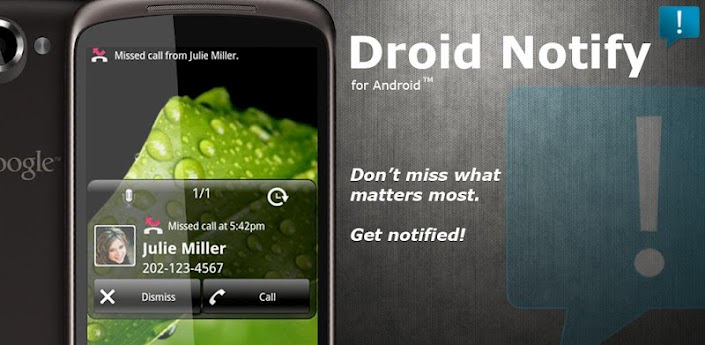
Don't miss what matters most, get notified!

This application will display a popup notification window when certain phone/app events occur.

This app is extremely customizable with many options to suit your needs and style.

Updates and new features are frequent.

What's in this version : (Updated : May 29, 2012)
Added support for the app K-9 For Pure Widgets
Added support/fixed conflicts with the Avast Mobile Security app
Updated the code that turns on the screen to help with a "flashing screen" issue.
Fixed duplicate SMS message/popup bug.
Updated translations.
Small bug fixes.

Download

Download

Friday, May 25, 2012

Ringo+ Ringtones & Text tones v1.3.16 APK

Best Blog Tips
| |
0 comments

Set MP3 ring and SMS tones for contacts, get total control of notifications!

Supercharge your Text & Call Notifications with Ringo Pro, the leading customisation app for Android!

Ringo lets you easily pick and use any MP3 music file as your ringtone - and set individual ringtones for each of your contacts and caller groups.

Ringo really powers up your SMS text message notifications too - set a different tone for each contact's messages, and control LED colors (when supported), caller or message sender voice announcing, pop-up notifications and more!

In fact, Ringo Pro allows you to customize almost every aspect of ring tone and SMS notification. If you are one of the many people who don’t notice the polite vibrating of the phone when it rings, Ringo Pro offers a much stronger vibration. Vibration patterns are aptly named: Discreet, Classic, Enthusiastic, Frenzied, and Relentless.

Ringo Pro will really shine as you start to apply its custom settings to caller groups and to individuals in your contact list. Each person can be assigned a unique ring tone, unique SMS tone, their own color of blinking LED (on phoens that support it), and a unique level of vibrate intensity. You will know instantly whether a call is from your brother, boss, or broker. One user sets a discrete ring tone and SMS tone as a default, then gives each important caller his or her unique tones.

Ringo Pro is packed full of customization options, so you can configure your incoming calls and SMS Text alerts exactly how you want them!

What's in this version:
We've improved compatibility with GO SMS, and fixed a bug which mixed up the notifications for recent messages.


Download

Download

Popup Notifications v0.9.38 APK

Best Blog Tips
| |
0 comments

Popup Notifications for Android was inspired by a great app called SMS Popup. Now that SMS Popup is no longer supported and is abandoned...now enters Popup Notifications for Android. We have taken the concept of popup notifications, have re-written the code from the ground up and are expanding upon it by adding user requested features such as multiple unread popup scrolling, themes and 3rd party plugins.

Other features include: delivery reports, customization of the popup, long press options, reminders, quick replies and more! Coming very soon: popup themes and plugins for system and 3rd party apps to bring you a variety of notification popups. Please feel free to contact us to make plugin suggestions.

Features:

    Scrolling for multiple unread popups.
    Contact specific notifications.
    Tablet friendly.
    Long press options.
    Popup customizations like hiding contact pictures, hiding all buttons and long press option.

What's in this version : (Updated : May 21, 2012)

    Improved Lock Screen integration: New options to bypass the lock screen and re-enabling it after dismissing the popup.
    Pocket Protector option that prevents bypassing the lock screen when a popup is shown. This option uses the phones proximity sensor, if available.
    Disable Vibration on Dock option, which prevents the phone from vibrating when docked.
    Improved Theme support to allow for per contact popup themes.
    Minor bugfixes and UI enhancements

Cracked by chathu_ac

Download
Download

Tuesday, May 01, 2012

Popup Notifications v0.9.36 APK

Best Blog Tips
| |
0 comments

Popup Notifications for Android - Spiderfly Studios

Special thanks goes to Ioannis Sermetziadis for contributing the excellent programming skills which brought this concept to life.

Key Features:

Key Features:
- 100% ICS compatible.
- Scrolling for multiple unread popups.
- Single lines of text are centered, while multiple lines are left aligned for easier reading.
- Contact specific notifications.
- Tablet friendly.
- Long press options.
- Popup customizations like hiding contact pictures, hiding all buttons and long press option.
- Popup themes.

Download

Tuesday, April 24, 2012

iPhone Notifications full v4.4 APK

Best Blog Tips
| |
0 comments
iPhone Notifications shows your Android device’s notifications with IOS5 fashion
With iPhone Notifications you can greatly improve the way your Android device displays notifications. You can display your notifications with exactly the same fashion as on IOS5.

To work properly, iPhone Notifications requires that you activate the accessibility service « iPhone Notifications Service » (accessibility services are currently the only way to process notifications on Android systems).
- After installing, click « Open »
- Click « Activate the service »
- If it’s not already checked, check « Accessibility »
- Check « iPhone Notifications Service »
- Confirm
–== HOW TO USE IT ==–
Once you have activated the service and configured the app, you can choose to display each app’s notifications as alerts or banners.
Banners :
- Click the notification to launch it
- Swipe to the right to dismiss it
- Swipe to the left to clear all upcoming notifications
Alerts :
- Click “View” to launch it
- Click “Close” to dismiss it
Note that dismissing the notification won’t remove it from the status bar (Android system doesn’t allow to manually remove notifications from the status bar)
If you use a custom lockscreen app such as MagicLocker or WidgetLocker, the banners will show above your lockscreen.
–== LITE VS PRO ==–
With the full version of iPhone Notifications :
- You can display the full notification text
- You can choose the banners timeout, and make them permanent
- You can choose to make the alerts appear only when the screen is off
- You can choose the screen timeout when an alert shows up, and make it stay on until you read it
- You can lower the brightness of the screen when the alert makes the phone wake up
To receive notifications from an app, check it in the « Monitoring » section of the preferences.
Here are some examples of apps to check :
- Missed calls : Will show « Missed call from [caller] »
- Messaging apps (GO SMS, Handsent SMS, Trillian, Facebook Chat, Google Talk, …) : Will show a popup with the ID of the sender and the content of the message
- Facebook
- Twitter
- GMail
- K-9 Mail : Will show the ID of the sender and the subject of the mail
- Status bar : Will show popups such as « USB connected », « Battery low » or « Battery fully charged »
- Dropbox
- Email
Apps used on the screenshots :
- Espier Launcher
- MagicLocker with iPhone Lockscreen theme

Download

Saturday, April 21, 2012

NotifierPro Plus v4.9 APK

Best Blog Tips
| |
0 comments

NotifierPro displays your notifications with a modern style. NotifierPro greatly improves the way your phone displays notifications.

--== TO ACTIVATE THE SERVICE ==--

To work properly, NotifierPro requires that you activate the accessibility service « NotifierPro Service » (accessibility services are currently the only way to process notifications on Android systems)
- After installing, click « Open »
- Click « Activate service »
- If it’s not checked, check « Accessibility »
- Check « NotifierPro Service »
- Confirm

Your notifications will now be displayed.

--== HOW TO USE IT ==--

Once you have activated the service and configured the app, your notifications will show up on your screen :
- Click the notification to launch it
- Swipe to the right to dismiss it
- Swipe to the left to clear all upcoming notifications

Note that dismissing the notification won’t remove it from the status bar (Android system doesn’t allow to manually remove notifications from the status bar)

If you use a custom lockscreen app such as <b>MagicLocker</b> or <b>WidgetLocker</b>, the notifications will show <b>above your lockscreen</b>.

--== LITE VS PRO ==--

With the full version of NotifierPro :
- You can <b>choose the position of the notification</b>
- You can <b>choose the duration of the notification</b>, and make it <b>permanent</b>
- You can choose to <b>animate the notifications</b>
- You have access to <b>6 exclusives themes</b>

--== CONFIGURATION ==--

To receive notifications from an app, check it in the « Monitoring » section of the preferences.

Here are some examples of apps to check :
- Missed calls : Will show « Missed call from [caller] »
- Messaging apps (GO SMS, Handsent SMS, Trillian, Facebook Chat, Google Talk, …) : Will show a toast with the ID of the sender and the content of the message
- Facebook
- Twitter
- GMail
- K-9 Mail : Will show the ID of the sender and the subject of the mail
- Status bar : Will show toasts such as « USB connected », « Battery low » or « Battery fully charged »
- Market : Will show toasts such as « New updates available » or « Download finished »
- Calendar
- Dropbox
- Email

Apps used on the screenshots :
- LauncherPro
- MagicLocker with Typophone theme

What's in this version:
HUGE update:
Optimised for ICS
New default theme
Numerous new options
Updated translations
Bug fixes

Download

iPhone Notifications v5.0 APK Full

Best Blog Tips
| |
0 comments

iPhone Notifications shows your Android device's notifications with IOS5 fashion. With iPhone Notifications you can greatly improve the way your Android device displays notifications. You can display your notifications with exactly the same fashion as on IOS5.

--== TO ACTIVATE THE SERVICE ==--
To work properly, iPhone Notifications requires that you activate the accessibility service « iPhone Notifications Service » (accessibility services are currently the only way to process notifications on Android systems).
- After installing, click « Open »
- Click « Activate the service »
- If it’s not already checked, check « Accessibility »
- Check « iPhone Notifications Service »
- Confirm

--== HOW TO USE IT ==--
Once you have activated the service and configured the app, you can choose to display each app's notifications as alerts or banners.
Banners :
- Click the notification to launch it
- Swipe to the right to dismiss it
- Swipe to the left to clear all upcoming notifications
Alerts :
- Click "View" to launch it
- Click "Close" to dismiss it
Note that dismissing the notification won’t remove it from the status bar (Android system doesn’t allow to manually remove notifications from the status bar)

--== LITE VS PRO ==--
With the full version of iPhone Notifications :
- You can display the full notification text
- You can choose the banners timeout, and make them permanent
- You can choose to make the alerts appear only when the screen is off
- You can choose the screen timeout when an alert shows up, and make it stay on until you read it
- You can lower the brightness of the screen when the alert makes the phone wake up

--== CONFIGURATION ==--
To receive notifications from an app, check it in the « Monitoring » section of the preferences.
Here are some examples of apps to check :
- Missed calls : Will show « Missed call from [caller] »
- Messaging apps (GO SMS, Handsent SMS, Trillian, Facebook Chat, Google Talk, …) : Will show a popup with the ID of the sender and the content of the message
- Facebook
- Twitter
- GMail
- K-9 Mail : Will show the ID of the sender and the subject of the mail
- Status bar : Will show popups such as « USB connected », « Battery low » or « Battery fully charged »
- Dropbox
- Email

Download

WP7 Notifications Plus v4.0 APK

Best Blog Tips
| |
0 comments

WP7 Notifications greatly improves the way your Android device displays notifications. You can display all your Android notifications in the same way than on Window Phone 7.

--== TO ACTIVATE THE SERVICE ==--
To work properly, WP7 Notifications requires that you activate the accessibility service « WP7 Notifications Service » (accessibility services are currently the only way to process notifications on Android systems)
- After installing, click « Open »
- Click « Activate service »
- If it’s not checked, check « Accessibility »
- Check « WP7 Notifications Service »
- Confirm

Your notifications will now be displayed.

--== USING THE APP ==--

When a notification shows up :
- Click on it to launch it
- Swipe it to the right to dismiss it
- Swipe to the left to clear all upcoming notifications

If you use a custom lockscreen app such as <b>MagicLocker</b> or <b>WidgetLocker</b>, the notifications will show <b>above your lockscreen</b>.

--== LITE VS PRO ==--

With the full version of WP7 Notifications :
- You can <b>choose the duration of the notification</b>, and make it <b>permanent</b>
- You can choose to <b>animate the notifications</b>
- You can display a nice <b>shadow</b> under the notification
- You can <b>choose the color</b> for the notification
- You can make your phone <b>wake up</b> when you receive a notification
- You can choose an <b>alternate 2 lines layout</b>
- You can set <b>custom vibration patterns</b>
- You can choose the <b>action when you do a left swipe on the banner</b>
- You can set <b>quiet hours</b>
- You can use <b>reminders</b>

--== CONFIGURATION ==--

To receive notifications from an app, check it in the « Monitoring » section of the preferences.

Here are some examples of apps which work fine with WP7 Notifications :
- Google Voice
- Trillian
- Handsent SMS
- GoSMS
- Facebook Messenger
- K9 Mail / Kaiten Mail
- Metro Messaging Beta
- ChompSMS
- Messenger WithYou
- eBuddy
- MB Notifications for Facebook

Apps used on the screenshots :
- Launcher 7
- MagicLocker with Typophone theme

What's in this version:
HUGE update:
Optimised for ICS
Numerous new options
Updated translations
Bug fixes

Download

NotifierPro Plus v4.8 APK Mediafire

Best Blog Tips
| |
0 comments

NotifierPro displays your notifications with a modern style. NotifierPro greatly improves the way your phone displays notifications.

--== TO ACTIVATE THE SERVICE ==--

To work properly, NotifierPro requires that you activate the accessibility service « NotifierPro Service » (accessibility services are currently the only way to process notifications on Android systems)
- After installing, click « Open »
- Click « Activate service »
- If it’s not checked, check « Accessibility »
- Check « NotifierPro Service »
- Confirm

Your notifications will now be displayed.

--== HOW TO USE IT ==--

Once you have activated the service and configured the app, your notifications will show up on your screen :
- Click the notification to launch it
- Swipe to the right to dismiss it
- Swipe to the left to clear all upcoming notifications

Note that dismissing the notification won’t remove it from the status bar (Android system doesn’t allow to manually remove notifications from the status bar)

If you use a custom lockscreen app such as <b>MagicLocker</b> or <b>WidgetLocker</b>, the notifications will show <b>above your lockscreen</b>.

--== LITE VS PRO ==--

With the full version of NotifierPro :
- You can <b>choose the position of the notification</b>
- You can <b>choose the duration of the notification</b>, and make it <b>permanent</b>
- You can choose to <b>animate the notifications</b>
- You have access to <b>6 exclusives themes</b>

--== CONFIGURATION ==--

To receive notifications from an app, check it in the « Monitoring » section of the preferences.

Here are some examples of apps to check :
- Missed calls : Will show « Missed call from [caller] »
- Messaging apps (GO SMS, Handsent SMS, Trillian, Facebook Chat, Google Talk, …) : Will show a toast with the ID of the sender and the content of the message
- Facebook
- Twitter
- GMail
- K-9 Mail : Will show the ID of the sender and the subject of the mail
- Status bar : Will show toasts such as « USB connected », « Battery low » or « Battery fully charged »
- Market : Will show toasts such as « New updates available » or « Download finished »
- Calendar
- Dropbox
- Email

Apps used on the screenshots :
- LauncherPro
- MagicLocker with Typophone theme

What's in this version:
HUGE update:
Optimised for ICS
New default theme
Numerous new options
Updated translations
Bug fixes

Download

Like Us On Facebook

Dont Forget to Like on Facebook to receive Updates.
Powered by Blogger.

ShareThis